Plan Cuts from Measured Plywood Offcuts: A Finite-Stock Example
Load two measured remnants and five panels in a portable SawNest project. Verify exact stock usage, kerf, grain and shortage behavior before buying another sheet.
A saved offcut is one physical piece, not an unlimited stock size. This example plans five small panels from exactly two measured rectangular remnants. It demonstrates inventory quantities and shortages, complementing the separate guide on which scraps to keep.
Download a complete two-remnant project
Download the portable practice project, open the project workspace, and choose Open project JSON. Inspect the preview before choosing Replace current project. This replaces all current material groups and inputs; download your current project first if you need to keep it. Keep current project cancels the import without replacing your work.
The original example uses millimeters, Demo 18 mm plywood, one 300 × 600 mm remnant, one 300 × 400 mm remnant and five 280 × 180 mm panels. It selects finite inventory, 3 mm kerf, zero additional edge trim and no grain constraint. The zero prices mean no purchase cost is modeled, not that real plywood is free.
Check the rectangles before using the result
Both remnants are marked measured. Their dimensions must represent sound usable rectangles after excluding defects, not the bounding box of an L-shaped scrap. The zero trim assumes these usable edges are already acceptable. Re-measure and set appropriate trim for your own material.
The fixture deliberately has no grain constraint. Do not carry that setting into a veneer job without review. Record actual material, measured thickness, finish, grain and usable dimensions; similar-looking remnants are not automatically compatible.
Inspect the five-panel placement
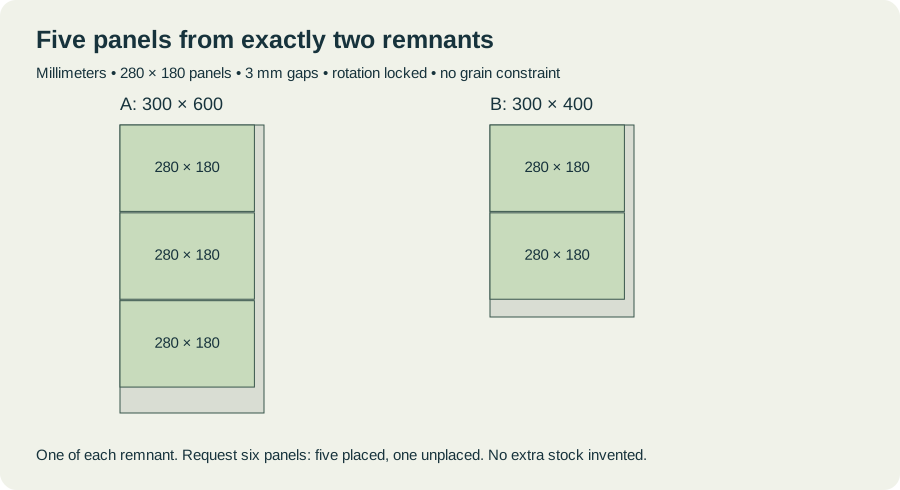
The real finite-stock engine places three panels on Remnant A at y = 0, 183 and 366 mm, and two on Remnant B at y = 0 and 183 mm. Each panel is 280 mm wide by 180 mm long with rotation disabled. The 183 mm step preserves a 3 mm gap.
Both stock quantities are one and both are consumed once. Total part area is 252,000 mm² from 300,000 mm² of listed stock, giving 84% part-area utilization. This is a reproducible result for these exact inputs, not a typical waste-saving claim or a machine-ready cutting sequence.
Try the shortage check
Change the requested quantity from five to six. With this finite inventory and orientation constraint, only five panels fit and one remains unplaced. The planner must not invent a third remnant. Restore five after the check.
A shortage is useful information. Add only stock you actually have or deliberately plan to buy, using the correct material and quantity. Increasing the displayed stock count without another physical piece defeats the purpose of finite inventory.
Keep the saved project and the rack in sync
The portable file preserves this reviewed project; it is not an automatic stock-management system. If you cut a remnant, update your records and re-measure any usable remainder before planning it again. Saving a file does not reserve stock from other jobs.
For storage thresholds and labels, use which plywood offcuts are worth saving. For general rectangular parts from a spreadsheet, use the CSV importer; this downloadable project is different because it also carries finite stock and planning settings.